In this guide, we’ll explain what SOC automation actually means in 2026, discuss the evolution toward AI-driven operations, and list the best tools on the market right now. We’ll also cover how to pick the right fit for your environment without adding more complexity to your stack.
What Is SOC Automation (And Why It Matters)

SOC automation uses technology to handle repetitive, time-consuming security tasks such as alert triage, threat enrichment, indicator lookups, containment actions, and report generation. By automating these processes, organizations free up analysts to focus on higher-level investigation and strategy.
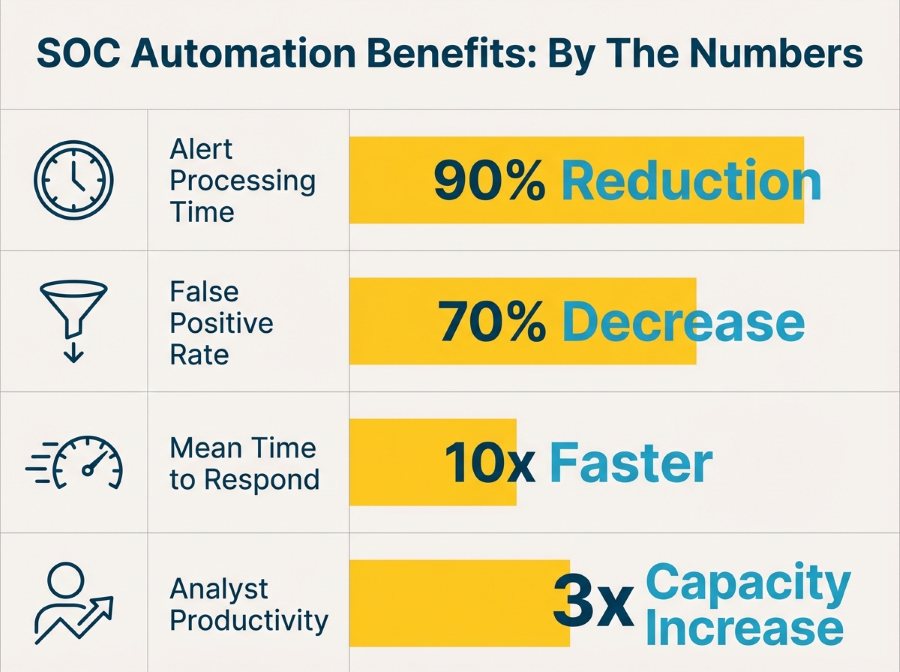
The need for automation has grown significantly. Research shows the average SOC analyst receives over 4,000 alerts per day but can investigate only about 10% of them. Organizations with mature SOC automation capabilities reduce their mean time to respond (MTTR) by up to 90%, while also seeing fewer false positives and improved analyst retention.
SOC Automation 2.0: The AI Evolution in Security Operations
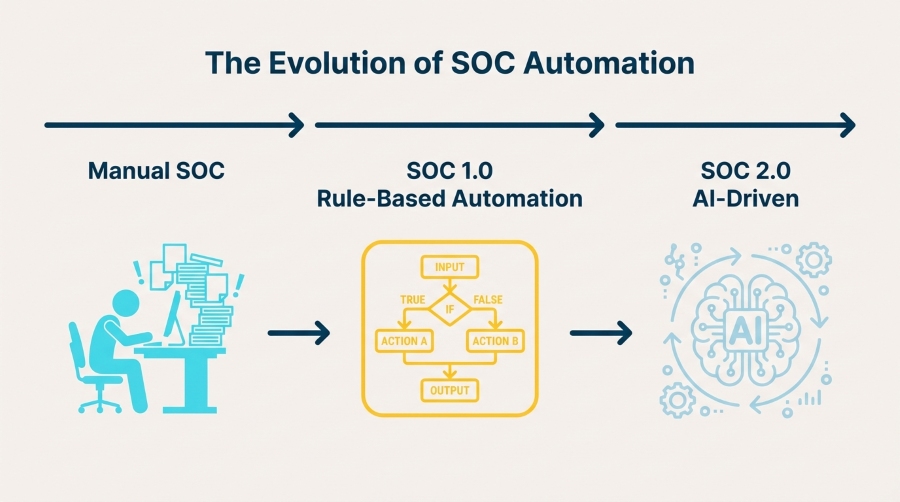 The Evolution of SOC Automation
Traditional SOC automation relied on rule-based playbooks: an alert triggers a predefined sequence of actions. While effective for known scenarios, this approach struggles with novel or complex threats that don’t follow predictable patterns.
Modern AI-powered SOC platforms go further by incorporating machine learning and adaptive decision-making. Key capabilities include:
- Signal-to-noise separation: ML models trained on millions of security events identify subtle patterns and filter out false positives that consume analyst time.
- Adaptive threat detection: Rather than requiring manually written detection rules, AI systems learn from behavioral patterns and flag anomalies automatically.
- Contextual enrichment: AI pulls together threat intelligence, historical data, and environmental context in seconds, accelerating investigation.
- Autonomous response: Agentic AI platforms can execute containment actions, quarantine compromised hosts, and block malicious traffic based on verified evidence.
When evaluating AI-driven SOC platforms, explainability is a critical factor. Platforms that can surface the reasoning and evidence behind their decisions give security teams the visibility needed to maintain trust and oversight.
Best SOC Automation Tools in 2026
These are the tools that efficient SOC teams actually use.
1. VMRay UniqueSignal
If you’re building AI-driven automation or training machine learning models, the quality of your threat intelligence determines everything.
VMRay UniqueSignal is a threat intelligence feed built from actual malware behavior, not just hashes and domains scraped from public sources. Every indicator comes with deep context: what the malware did, what techniques it used, what families it belongs to, and why it matters.
What makes it different:
- Behavioral indicators that work even when malware morphs
- Automated daily updates from real sandbox analysis
- Low false positive rates
- Ready for automation (structured data that your SOAR or SIEM can actually use)
Best for: Threat intelligence platforms, SIEM enrichment, proactive threat hunting, and training AI models on reliable data.
2. Splunk SOAR
Splunk SOAR (formerly Phantom) is the gorilla in the SOAR space. If you’re already running Splunk Enterprise Security, SOAR is a natural extension that orchestrates actions across your entire security stack.
Strengths:
- Massive integration library (1,000+ apps and connectors)
- Playbook marketplace with pre-built workflows
- Visual playbook editor that doesn’t require coding
- Strong community support
Trade-offs: Complex to implement at scale, licensing can get expensive, and you’ll likely need dedicated resources to maintain playbooks.
Best for: Large enterprises with diverse security stacks and dedicated SOC automation teams.
3. Palo Alto Cortex XSOAR
Cortex XSOAR brings orchestration, case management, and threat intelligence into one platform. It’s particularly strong if you’re already invested in the Palo Alto ecosystem.
Strengths:
- Incident management built in
- Threat Intelligence Management module included
- ML-powered playbook recommendations
- Strong focus on analyst collaboration features
Trade-offs: Can feel overwhelming to set up, steep learning curve for playbook development.
Best for: Mid-to-large SOCs looking for an all-in-one platform with strong case management.
4. Microsoft Sentinel
If you’re running Microsoft infrastructure, Sentinel makes a lot of sense. Native integration with Microsoft 365, Azure AD, and Defender creates powerful automation possibilities.
Strengths:
- Cloud-native architecture
- Automated threat detection with built-in ML
- Logic Apps for workflow automation
- Cost scales with actual usage
Trade-offs: Less flexible than dedicated SOAR platforms, automation capabilities aren’t as mature as standalone tools.
Best for: Microsoft-heavy environments, cloud-first organizations, and teams that want fast time-to-value without complex deployments.
5. Swimlane
Swimlane has carved out a niche as the low-code automation platform that security teams can actually use without needing a development team.
As a mature SOC tool, it is often used for compliance automation, helping teams standardize workflows, evidence collection, and reporting across regulated environments.
Strengths:
- Drag-and-drop automation builder
- Strong focus on case management and reporting
- Good balance between power and usability
- Flexible deployment options (cloud, on-prem, hybrid)
Best for: Mid-size SOCs that want powerful automation without the complexity overhead of enterprise platforms.
6. Torq
Torq represents the newer generation of security automation platforms built cloud-first with a focus on developer-friendly workflows. Its key features center on speed, modularity, and API-driven orchestration, making it a strong fit for SOCs modernizing their automation layer without sacrificing control.
Strengths:
- Modern API-first architecture
- No-code and full-code options side by side
- Fast deployment and time-to-value
- Strong workflow versioning and testing capabilities
Best for: Forward-thinking SOCs comfortable with modern DevOps practices and API-driven integrations.
7. Radiant Security
Radiant Security brings agentic AI to SOC automation with a focus on autonomous investigation and response. By advancing toward an autonomous SOC model, it enables security teams to offload routine investigation tasks while maintaining oversight through explainable, human-governed AI decisions.
Strengths:
- AI agents that handle end-to-end incident investigation
- Human-in-the-loop design for sensitive decisions
- Strong explainability features
- Purpose-built for SOC workflows
Best for: SOCs looking to push beyond traditional automation into AI-driven autonomous operations.
8. UnderDefense
UnderDefense’s Agentic AI SOC runs on your existing SIEM, EDR, cloud, and identity stack. AI investigates every alert in ~2 minutes with 96% MITRE ATT&CK coverage, while human analysts validate escalations in under 15 minutes. Confirmed incidents go straight to UnderDefense’s in-house IR team—no separate retainer required.
Strengths:
- 830% documented ROI over three years, with ~99% alert noise reduction
- SIEM implementation support for organizations that don’t have one yet, handled by the same team running your SOC
- Full on-premises and air-gapped deployment, keeping telemetry inside your own infrastructure
- 250+ integrations across any SIEM, EDR, or cloud stack
- Auditable investigation decisions, traceable for post-incident review or compliance reporting
- 200+ enterprise customers across the US and Europe
Trade-offs: No independent third-party detection benchmark (e.g., MITRE ATT&CK Evaluations) published yet, and engagements start with a scoped onboarding rather than instant self-serve setup.
Best for: Mid-to-large enterprises running multi-vendor, hybrid environments that need machine-speed SOC coverage backed by hands-on incident response
| Platform |
Primary Role |
AI-Powered |
Key Differentiator |
Best Fit |
| VMRay UniqueSignal |
Threat Intelligence |
✅ |
Behavior-based intelligence with rich context, low false positives, and automation-ready data for SIEM, SOAR, and AI models |
Threat hunting, SIEM enrichment, AI-driven detection |
| Splunk SOAR |
SOAR |
⚠️ |
Largest integration ecosystem (1,000+ connectors) |
Large enterprise SOCs |
| Cortex XSOAR |
SOAR + Case Management |
⚠️ |
Unified automation, case management, and threat intel |
Palo Alto customers |
| Microsoft Sentinel |
Cloud SIEM/SOAR |
⚠️ |
Native Microsoft ecosystem integration |
Microsoft-first organizations |
| Swimlane |
Low-Code SOAR |
❌ |
Easy workflow automation and compliance reporting |
Mid-size SOCs |
| Torq |
Cloud Automation |
⚠️ |
API-first, developer-friendly orchestration |
Cloud-native SOCs |
| Radiant Security |
Agentic AI SOC |
✅ |
Autonomous investigations with explainable AI |
AI-first SOC operations |
| UnderDefense Agentic AI SOC |
Managed AI SOC |
✅ |
AI investigates alerts in ~2 min, human validation (<15 min SLA), integrated IR team |
Hybrid enterprise SOCs |
How to Choose the Right SOC Automation Tools for Your Team
Not every tool fits every environment, and buying the wrong platform wastes time, money, and political capital.
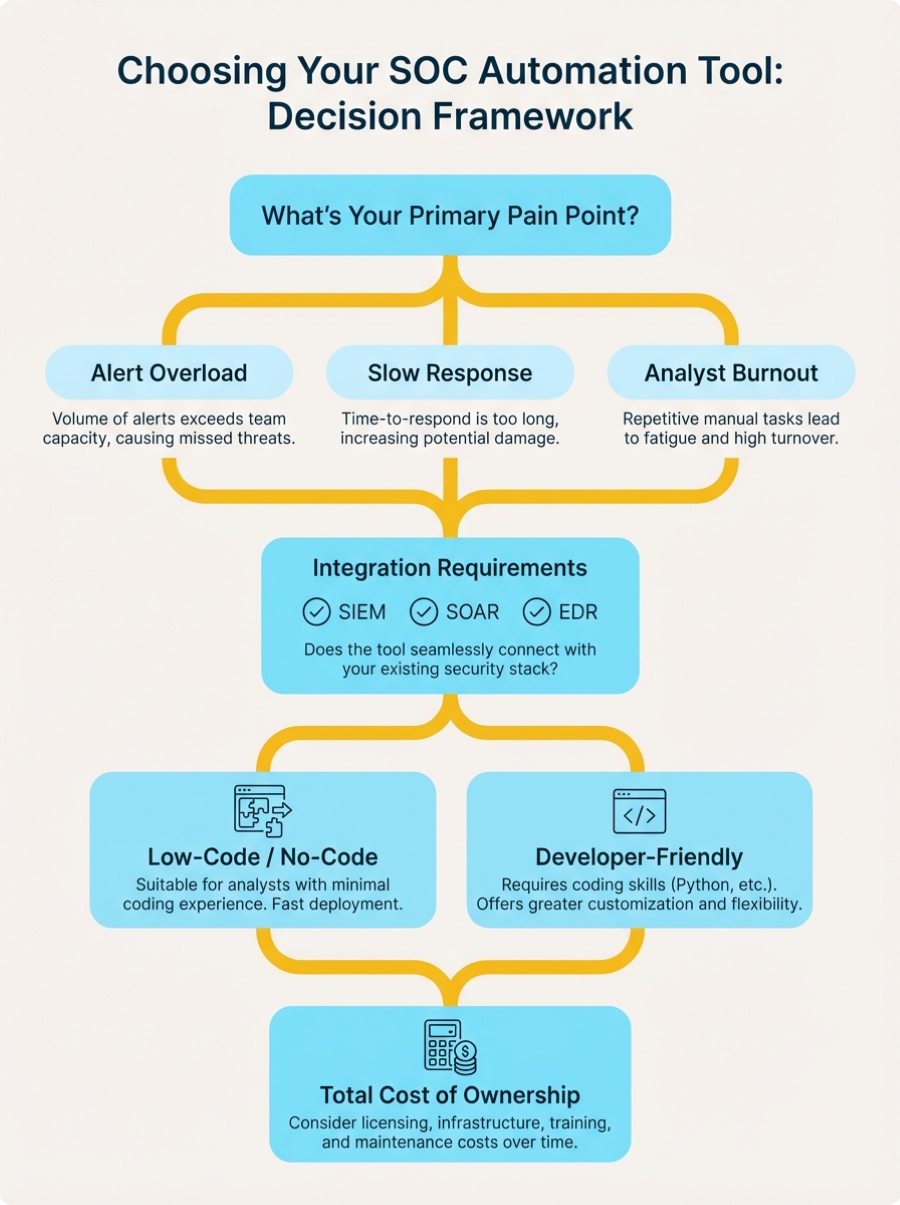
Start With Your Pain Points
Don’t buy a tool because it’s on every vendor’s top-10 list. Start with the problems you’re actually trying to solve:
- Drowning in alerts? Focus on tools with strong triage and enrichment capabilities
- Slow incident response? Look for platforms with fast playbook execution and broad integrations
- Can’t keep up with threat intelligence? Prioritize solutions that automate IOC enrichment and feed hunting workflows
- Analyst burnout? Choose tools that genuinely reduce manual work, not just shift it around
Integration Is Everything
The best automation tool in the world is useless if it can’t talk to your existing stack. Check for:
- Native connectors to your SIEM, EDR/XDR, firewall, and email security platforms
- API flexibility for custom integrations
- Webhook support for real-time event triggers
- Ease of adding new integrations as your stack evolves
VMRay’s platform, for example, connects seamlessly with major SIEM platforms (Splunk, Microsoft Sentinel, Elastic), SOAR tools, and EDR solutions through built-in connectors and REST API .
Data Quality Matters More Than You Think
If you’re building AI-powered workflows or training machine learning models, garbage in = garbage out. Automation amplifies whatever you feed it. High-quality threat intelligence becomes critical when decisions happen at machine speed.
Look for tools that provide:
- Explainable results
- Low false positive rates
- Rich context and attribution
- Behavioral indicators, not just static IOCs
Think About Your Team’s Capabilities
Does your team have the engineering resources to build and maintain complex playbooks? Do you have dedicated automation engineers, or are your analysts handling it between incidents?
- Limited resources: Choose low-code platforms with strong marketplace support
- Strong engineering team: Go for flexible, API-first platforms that give you more control
- Mixed capabilities: Look for tools that support both approaches
Consider Total Cost of Ownership
The sticker price is just the beginning. Factor in:
- Implementation costs (time and services)
- Training requirements
- Ongoing maintenance burden
- Hidden costs (per-action pricing, data ingestion fees, additional modules)
Sometimes a tool that costs more upfront saves you money over time if it’s easier to maintain and requires less specialized expertise.
Common Pitfalls to Avoid
Let’s talk about the mistakes we see teams make when rolling out SOC automation:
Automating Bad Processes
Automation makes things faster. If your manual processes are broken, automation just breaks them faster. Before automating, clean up your workflows, document your logic, and get team buy-in on the approach.
Over-Automating Too Quickly
Start with high-value, low-risk use cases. Perfect your phishing triage workflow before trying to automate your entire incident response program. Build confidence gradually.
Ignoring the Human Element
Tools don’t fix organizational problems. If your SOC team doesn’t trust the automation or understand how it works, they’ll work around it. Invest time in training, documentation, and change management.
Neglecting Playbook Maintenance
Your environment changes. Threats evolve. Those playbooks you built six months ago? They need regular updates. Treat automation workflows like code—version control, testing, and continuous improvement.
Getting Started: Your Action Plan
If you’re ready to level up your SOC automation game, you can start by doing the following:
- Audit your current state: Where do your analysts spend the most time? What tasks are repetitive? What bottlenecks slow down your response?
- Prioritize quick wins: Pick 2-3 high-volume, low-complexity use cases where automation would make an immediate difference
- Evaluate tools: Run pilots with real data from your environment
- Build gradually: Start small, measure results, iterate, and expand
- Invest in your team: Training and change management matter as much as the technology
Automation should make your analysts’ lives better, not just make them faster at doing work they hate. If your team isn’t excited about the automation you’re building, you’re probably building the wrong thing.
Final Thoughts
SOC automation isn’t about replacing human analysts. It’s about giving them superpowers. The best tools handle the repetitive, exhausting tasks that burn people out, freeing your team to do the creative, strategic work that actually requires human intelligence.
In 2026, the question isn’t whether to automate, but how quickly you can do it without breaking things. Start with your biggest pain points, choose tools that integrate with your existing stack, and build automation that your team will actually use.
Whether you’re investigating malware with advanced sandbox analysis , enriching alerts with behavioral threat intelligence , or orchestrating responses across your entire security stack, the right automation tools turn your SOC from a reactive alert factory into a proactive threat-hunting operation.
What’s the one workflow you’d automate today if you could wave a magic wand? That’s where you should start.
FAQs
What’s the difference between SIEM and SOAR?
SIEM (Security Information Event Management) collects and analyzes security logs from across your infrastructure to detect threats. SOAR (Security Orchestration Automation Response) orchestrates actions across multiple security tools and automates response workflows. They work together: SIEM detects cyber threats, and SOAR automates the response.
How much does SOC automation cost?
SOC automation tools range from $10,000 to $500,000+ annually depending on deployment size, features, and vendor. Cloud-based platforms like Microsoft Sentinel use consumption pricing (pay per GB ingested), while enterprise SOAR platforms like Splunk and Cortex XSOAR typically charge $100,000-$300,000 per year based on analyst seats or use cases. Don’t forget implementation costs—budget 20-30% of license fees for professional services and training.
What are the best free SOC automation tools?
Open-source options include TheHive (case management), Shuffle (SOAR orchestration), Wazuh (SIEM), and MISP (threat intelligence). These work well for smaller teams or learning environments. However, enterprise-grade commercial tools like VMRay, Splunk SOAR, and Cortex XSOAR offer better integration ecosystems, dedicated support, advanced AI capabilities, and lower total cost of ownership when you factor in maintenance time.
What tasks should I automate first in my SOC?
Start with high-volume, low-complexity tasks that don’t require human judgment:
- Phishing email analysis – Automated URL/attachment scanning and user notification
- Alert enrichment – Automatic IOC lookups in threat intelligence feeds
- Tier 1 triage – Rule-based alert categorization and prioritization
- Known false positive filtering – Automatic closure of recurring benign alerts
- Basic containment actions – Automated host isolation for confirmed threats
These quick wins demonstrate value fast and build confidence before tackling complex workflows.
How long does it take to implement SOC automation?
Implementation timelines vary widely. Simple use cases (like automated phishing response) can go live in 2-4 weeks. Comprehensive SOAR deployments typically take 3-6 months including planning, integration, playbook development, testing, and training. Cloud-based platforms like Microsoft Sentinel deploy faster (weeks) than on-premise solutions (months). Plan for an additional 3-6 months of optimization as you refine playbooks based on real-world performance.
What’s the ROI of SOC automation?
Most organizations see positive ROI within 12-18 months. Typical benefits include:
- Time savings : 40-60% reduction in analyst hours spent on repetitive tasks
- Faster response : 80-90% reduction in mean time to respond (MTTR)
- Better detection : 30-50% improvement in threat detection rates
- Cost avoidance : Reduced breach costs (average breach costs $4.45M according to IBM)
- Retention : Lower analyst turnover due to reduced burnout
Calculate your ROI by multiplying analyst time saved by hourly cost, then add breach risk reduction value.
Can AI really replace security analysts?
No, and that’s not the goal. AI excels at pattern recognition, processing huge datasets, and executing consistent workflows at machine speed. Humans excel at creative thinking, understanding context, making judgment calls in ambiguous situations, and adapting to novel or emerging threats. The future of SOC automation is augmentation, not replacement. AI handles the repetitive work so analysts can focus on what requires human intelligence.
What’s the difference between SOC automation and AI-driven automation?
Traditional SOC automation uses predefined playbooks with if-this-then-that logic. AI-driven automation (SOC Automation 2.0) uses machine learning to make contextual decisions based on patterns it learns from security data. For example, traditional automation might always quarantine files with certain hashes. AI-driven automation analyzes behavioral patterns, threat context, and environmental factors to decide the appropriate response level and adapts as threats evolve.
How do I integrate SOC automation with my existing tools?
Most modern automation platforms offer three integration methods:
- Pre-built connectors – Out-of-the-box integrations with popular tools (SIEM, EDR, firewall, email security). Check vendor marketplaces for your specific tools.
- REST APIs – Custom integrations for proprietary or niche tools. Requires some development work but offers maximum flexibility.
- Webhooks – Real-time event triggers for tools that support them.
Start with tools you use most frequently (SIEM, ticketing system, threat intelligence platform) and expand from there. VMRay, for example, integrates with all major SIEM, SOAR, EDR, and TIP platforms through built-in connectors.
What are the biggest mistakes security teams make with SOC automation?
The most common pitfalls we see when automating a security operations center:
- Automating broken processes – Automation makes things faster, including mistakes. Fix your workflows first.
- Starting too big – Trying to automate everything at once leads to complex, fragile systems. Start small and build gradually.
- Neglecting playbook maintenance – Your environment changes, threats evolve. Playbooks need regular updates or they’ll drift out of sync.
- Poor data quality – Automation amplifies whatever you feed it. Garbage in, garbage out.
- Ignoring the human element – If your team doesn’t trust or understand the automation, they’ll work around it.

